
When many educators hear the words assistive technology, they picture something electronic, specialized, and probably expensive. A speech-generating device. A sophisticated communication system. Customized computer software.
Those things can absolutely be assistive in technology. But so can….
Velcro.
That distinction matters, especially in early childhood classrooms, where a slight change to a material, environment, or routine may be all a child needs to participate more independently.
October’s National Disability Employment Awareness Month focuses on access and inclusion in the workplace. But the idea of functional access begins much earlier. In an early learning environment, we can ask a similar question: What does this child need to participate fully in the place where they spend their days?
And yes, sometimes the answer is digital. Sometimes it only costs a few dollars. Sometimes it is already sitting in the supply closet.
Start With the Barrier, Not the Gadget
In Every Child Can Fly: An Early Childhood Educator’s Guide to Inclusion, author Jani Kozlowski defines assistive technology broadly as an item, piece of equipment, or product system used to “increase, maintain, or improve functional capabilities.”
The important words are that there is no equipment or technology. They are functional capabilities.
What does a child need to be able to do?
A child wants to communicate with a choice but cannot yet do so verbally. Another child understands the story at circle time but has trouble holding or turning the pages of a book. A child with limited vision may need information shown differently. A child with fine-motor challenges may understand exactly what to do with a crayon but have difficulty gripping it.
Assistive technology is not about making a classroom more high-tech. It is about identifying what is getting between a child and meaningful participation, then finding a tool or adaptation that reduces that barrier.
Low-Tech Does Not Mean Low-Impact
Cindy Mudroch makes this continuum especially clear in Accessible Learning Spaces: A Guide to Implementing Universal Design in Early Childhood. She organizes support into low-, medium-, and high-tech interventions.
Low-tech options can include pencil grips, alternate writing tools, visuals, and other non-electronic aids. Medium-tech supports might include specialized seating or weighted lap pads. High-tech tools can include tablets, computers, and adaptive electronic equipment.
That means a visual schedule is technology. So is an adapted writing utensil. So is a communication board.
Kozlowski offers an even more striking comparison in Every Child Can Fly. Assistive technology can range from a voice-output communication device all the way down to Velcro used to fasten a child’s sneakers. The goal in either case is the same: helping the child gain access and function more independently during everyday activities and routines.
A tool does not have to be complicated to be transformative.
Look Around the Classroom Differently
Once we broaden our definition of “assistive technology,” opportunities begin showing up everywhere.
In Including All Children: Transitioning to an Inclusive Early Learning Program, Sarah Taylor Vanover describes practical accommodations that can make familiar classroom materials easier for children to use. For a child with fine-motor challenges, a teacher might stabilize art materials, make a writing tool thicker and easier to grip, adapt book pages so they are easier to turn, or adjust seating and positioning.
Technology can move farther along the continuum when that is what a child needs. Vanover describes using light tables to increase contrast for children with visual impairments, audiobooks, and digital tools to improve access for children with limited sight, and tablets with graphic pictures to help children with speech delays communicate with teachers and peers.
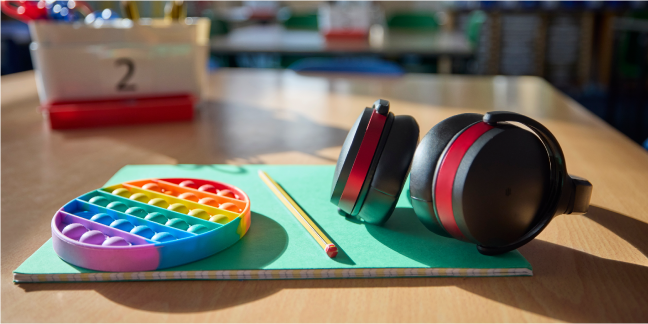
Even environmental changes count. Quieting scraping chair legs, reducing unnecessary noise, offering headphones, or creating a calmer place to work may allow a child with sensory needs to stay engaged in an activity instead of being overwhelmed by the environment.
The question is not, “Is this technology new and cool and impressive?”
It is, “Does this help the child participate?”
High-Tech Is Not Automatically Better
There can be a temptation to assume that the more advanced tool is the more effective one. But the best assistive technology is the one that addresses the actual barrier.
Mudroch cautions against choosing technology based on cost or novelty. Instead, she encourages educators to consider the range of available options and select the strategy most likely to help a child succeed. A book with modified pages may be exactly what one child needs. Another child may benefit more from a tablet with picture-based communication.
The same principle applies throughout the classroom.
If a pencil grip allows a child to draw with classmates, there is no need for a digital solution. If an audiobook lets a child access the same story as peers, that technology is serving a meaningful purpose. If an AAC (Augmentative and Alternative Communication) device gives a child a reliable way to say, “I want a turn,” “I need help,” or “I have an idea,” the technology is not replacing interaction. It is making interaction possible.
That is the goal.
Access Is More Than Getting Through the Door
Physical accessibility is essential, but inclusion requires more than simply placing children in the same room.
Vanover describes access as ensuring children can move through the classroom and use its materials. When one method creates a barrier, educators can offer another way to engage with the same content. A child who cannot yet use a pencil to form letters, for example, might explore those same letters through manipulatives or playdough.
This is where assistive technology and Universal Design for Learning naturally meet. Both encourage educators to move away from the assumption that every child should learn, communicate, move, or demonstrate understanding in the same way.
A classroom designed for participation asks a different question: How many ways can we make this learning accessible?
Make Participation the Measure
Assistive technology does not have to be announced.
It might be a strip of pictures near the sink reminding a child what comes next. It might be headphones that make a noisy classroom manageable. It might be a bookstand, adapted seating, an audiobook, a communication board, text-to-speech software, or an electronic AAC device.
What matters is what is becoming possible because the support is there.
Can the child make a choice? Join the activity? Communicating with a friend? Turn the page? Moving independently? Show what they know? Stay with the group? Experience the same learning alongside their peers?
When we begin with those questions, assistive technology stops being a collection of specialized devices reserved for a few children.
It becomes what it should be: a way to remove barriers so more children can fully participate, learn, communicate, and belong.
Don't forget to share this post:
